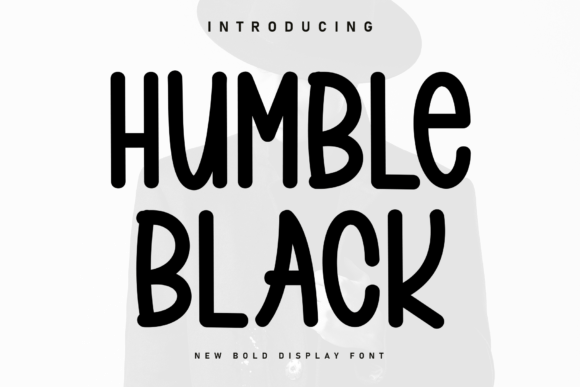
Humble Black Display Font Review for Bold Brand Headers
I opened a blank brand board on my monitor, staring at the empty white canvas that every designer knows too well. The client wanted a bakery identity that felt warm, approachable, and undeniably bold—no stiff corporate vibes, just friendly personality. That’s when I dragged Humble Black into the mix. As a new bold display font, it immediately grabbed attention with its thick, uniform stroke weight and slightly irregular, bouncy baseline. It didn’t just sit there; it jumped off the screen with character. After testing this typeface across a logo draft, packaging mockup, and social media layout, I’m ready to share how Humble Black performs in real-world branding projects.
Humble Black as a Bold Display Font for Bakery Packaging Design
When you need a premium font that commands space without shouting aggressively, Humble Black steps up as an excellent choice for packaging design. In my recent project for a local artisanal bakery, we needed product labels that stood out on crowded shelves. The font’s slightly irregular, bouncy baseline gave the label system a handcrafted feel, which aligned perfectly with the brand’s story of small-batch baking. Unlike rigid geometric sans-serifs, Humble Black feels alive, almost like it was stamped by hand but with the precision of digital typography. Its uniform stroke weight ensures legibility even at smaller sizes on jar lids or bag tags, making it a versatile display font for physical goods.
The visual hierarchy created by Humble Black is intuitive. Because every letter carries similar visual weight, it creates a solid block of text that draws the eye. For short phrases like “Freshly Baked” or “Organic Flour,” this consistency works beautifully. However, designers should note that this strength is also a limitation: long body text will feel monotonous and difficult to read. Keep Humble Black reserved for headlines, titles, and key messaging where impact matters more than narrative flow.
Humble Black for Creative Studio Logo Design and Identity Systems
Building a brand identity often starts with the logo, and Humble Black proved itself as a strong candidate for creative studios seeking modern typography. During the logo concept phase, I experimented with setting the studio name entirely in Humble Black. The result was striking—a heavy, confident mark that felt both playful and professional. The font’s unique charm lies in its subtle imperfections; those tiny variations in the baseline prevent it from looking too sterile or generic. This makes it ideal for brands that want to appear accessible rather than elitist.
In terms of versatility, Humble Black pairs well with cleaner sans serif fonts for secondary information. While the display font handles the emotional hook of the brand, a neutral sans-serif can manage operational details like addresses or contact info. This combination creates a balanced typographic system where Humble Black acts as the star, while supporting fonts provide structure. For logo design, ensure you test the wordmark at various scales. The thick strokes hold up well in large formats, such as storefront signage, but may lose definition if scaled down too far on mobile interfaces.
Humble Black in Web Design and Social Media Graphics
For digital platforms, adding a punch of friendly personality to your headers is crucial for engagement, and Humble Black delivers exactly that. On web design projects, using this creative font for hero sections or section dividers can break the monotony of standard web typography. Its bold presence helps establish immediate visual interest, encouraging users to stop scrolling and engage with the content. I tested Humble Black in a website header for a lifestyle blog, and the contrast between the heavy display letters and the clean white background created a sophisticated yet inviting aesthetic.
- Social Media Graphics: Use Humble Black for Instagram quotes or promotional banners. Its bouncy baseline adds movement to static images, making them more dynamic in a crowded feed.
- Web Headers: Ideal for H1 tags or call-to-action buttons where readability and style intersect. Ensure sufficient contrast against backgrounds to maintain accessibility.
- Email Newsletters: Great for subject lines or featured article titles to boost open rates through visual appeal.
However, caution is advised when integrating Humble Black into responsive web designs. Test how the font renders across different devices. While it looks stunning on desktop monitors, ensure that kerning and spacing remain intact on smaller screens. Sometimes, the slight irregularities in the baseline can cause minor alignment issues if not carefully managed in CSS styling.
Humble Black Font Pairing Strategies for Modern Typography
Selecting the right companion typeface is essential to maximize the potential of Humble Black. Since it is a bold display font with strong personality, it needs a calm partner to balance its energy. I found that pairing it with a light or regular weight sans serif font creates a harmonious contrast. The simplicity of the sans-serif allows Humble Black to shine as the focal point without competing for attention. Alternatively, combining it with a delicate script font can enhance the friendly, handwritten vibe, especially for brands in the craft or hospitality sectors.
Avoid pairing Humble Black with other heavy display fonts or overly decorative handwritten fonts. Doing so can create visual clutter and reduce overall readability. The goal is to let Humble Black’s unique baseline and uniform strokes take center stage. When designing business cards or flyers, use the paired font for body copy and contact details, reserving Humble Black for the brand name or main headline. This strategic use ensures that the audience’s eye is guided naturally through the design elements.
Practical Considerations for Using Humble Black in Commercial Projects
Before incorporating Humble Black into final client work, it’s important to review the included styles, alternates, and file formats. Check if the font supports multilingual characters if your brand operates internationally. Also, verify whether webfont versions are available for seamless integration into your digital workflows. Testing the font in black and white first helps assess its structural integrity before applying colors or effects.
Remember to check commercial font licensing carefully. Using Display Fonts in client projects, merchandise, or print-on-demand products requires appropriate licenses to avoid legal issues. Whether you’re creating templates, digital products, or physical branding assets, ensuring compliance protects both you and your client. By treating Humble Black as a specialized tool for headers and accents, you’ll leverage its strengths effectively while maintaining professionalism and clarity in your designs.